

Historical: Linux-based prototype
Destination disk detection
This page documents the earlier Linux-based prototype as of 24 November 2026. It does not describe the independent Khelforge OS, and its steps are not instructions for it. See the independent Khelforge OS.
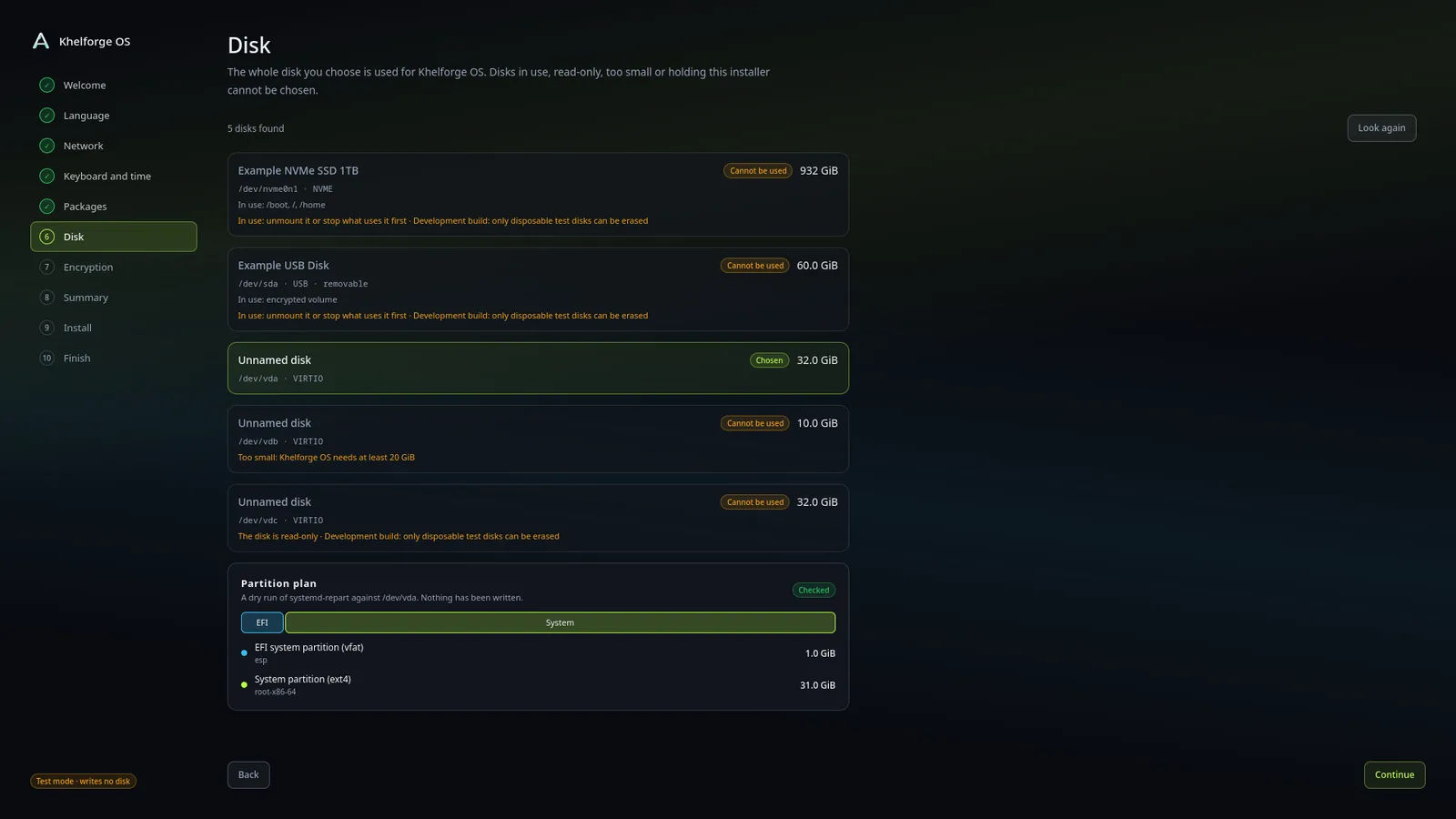
The installer lists whole disks, explains why a disk cannot be used, and checks again that a disk is the confirmed one before writing. This is covered by unit tests and by VM tests on virtual disks. No physical disk has ever been a destination.
Listing
Section titled “Listing”Only whole disks are shown. Loop devices, optical drives and zram are left out. For each disk the installer reads the path, model, serial number, connection type and size, whether it is read-only or removable, whether it has partitions, and what is using it.
The list is read when the Disk page opens, when Look again is chosen, and once more when the installation starts.
Refusals
Section titled “Refusals”| Reason | Condition |
|---|---|
| In use | The disk, a partition on it, or anything stacked on it is mounted, is swap, or is an open encrypted, LVM or RAID volume |
| Live medium | It is the disk the live system booted from |
| Read-only | Linux reports it as read-only |
| Too small | Smaller than 20 GiB |
| Not a test disk | In development builds, the disk is not a virtual disk made for tests |
All reasons that apply are listed on the disk’s card, and such a card cannot be chosen. The window and the installer backend both check this, so a refusal does not depend on the interface.
A current development build refuses every real disk, including an empty one.
Identity checks
Section titled “Identity checks”The installer checks that the disk present now is the one that was confirmed. It does this when the list is refreshed, when a plan is made, when the installation is started and immediately before writing.
Any difference stops the process before writing, with a message that nothing was written.
Confirmation
Section titled “Confirmation”Choosing a disk does not start anything. The Summary page warns that every partition, file and operating system on the disk will be erased. The confirmation dialog then needs the full path, such as /dev/vda, typed exactly. A partial path leaves the button disabled.
How it was tested
Section titled “How it was tested”- Unit tests use invented disks: a system NVMe disk, an encrypted USB disk, test disks, a small disk and a read-only disk.
- A test swaps a disk for another one of the same size and checks that nothing starts.
- VM tests ask for a disk whose size changed, a disk that is too small, the live system disk and the CD drive. All are refused, and the virtual disks are checked to contain no data afterwards.
Known limitations
Section titled “Known limitations”- An idle disk that holds data is not “in use”. Outside development builds it can be chosen, and the typed confirmation is the protection. Back up first.
- Only Linux’s view of the disk is used. The installer does not look for other operating systems.
- Recognising the live medium on a real ISO belongs to the unfinished phase 5.