

Historical: Linux-based prototype
Settings
This page documents the earlier Linux-based prototype as of 24 November 2026. It does not describe the independent Khelforge OS, and its steps are not instructions for it. See the independent Khelforge OS.
Settings shows information about the computer and changes a small set of things: your password, your recovery key, the screen lock time, reduced motion and key repeat. It is implemented, with unit tests, visual tests and VM tests. Most pages only show information.
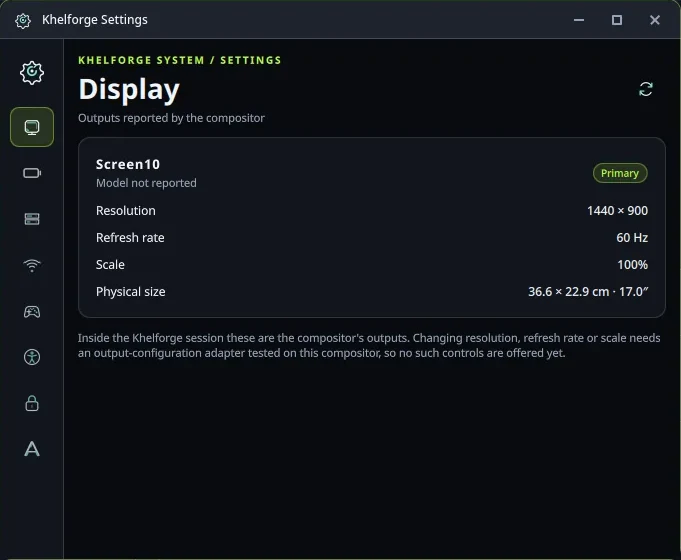
| Keys | Page | What it offers |
|---|---|---|
| Ctrl+1 | Display | Read-only information about each screen |
| Ctrl+2 | Power and Battery | Charge, health and mains state, read-only |
| Ctrl+3 | Storage | Space on each file system, read-only |
| Ctrl+4 | Network | Physical adapters, read-only |
| Ctrl+5 | Devices | Hardware list, drivers, key repeat. See Devices |
| Ctrl+6 | Accessibility | Reduced motion |
| Ctrl+7 | Account | Password, recovery key, screen lock |
| Ctrl+8 | About | System information |
In a narrow window, the navigation becomes an icon rail. F5 refreshes.
The Account page
Section titled “The Account page”The page shows one section at a time.
| Section | What you can do |
|---|---|
| Password | Change it through systemd-homed. An account with a recovery key must enter that key, not the old password. The page says why |
| Recovery key | Create a new key with your password, in three checked steps. The key is shown once |
| Encrypted backup | Save an encrypted copy of the recovery key, protected by a passphrase you choose |
| Screen lock | 1, 2, 5, 10, 15 or 30 minutes, or Never |
A saved backup that was made at first boot can be copied into your home. The page states that a copy inside the encrypted home cannot help if you lose the password, and asks you to copy it elsewhere. A backup by email needs an operator’s relay. No real relay exists, and it has been tested only against a local stand-in. See recovery keys.
Security and privacy
Section titled “Security and privacy”- The password and key sections use systemd-homed as your own user. The account service is used only to read and discard your own stored backup.
- MAC addresses, IP addresses, serial numbers and host names are never read for the Network or Devices pages.
- Preferences are stored in your own account.
How it was tested
Section titled “How it was tested”Unit tests of the password and recovery key sections use a stand-in for systemd-homed and check each refusal. The VM changes the password with the recovery key, replaces the recovery key, and checks that the old key stops working. Visual tests cover each page at different sizes and the account sections by keyboard.
Known limitations
Section titled “Known limitations”- No page changes display, sound, Wi-Fi, Bluetooth, time, language or the user’s name.
- Pointer and touchpad settings are shown as unavailable, with the reason.
- The password and recovery key sections need a systemd-homed account. Others are shown as unavailable.
- Account changes run one at a time.
Troubleshooting
Section titled “Troubleshooting”| Symptom | Explanation |
|---|---|
| The password change asks for the recovery key | This is expected for an account with a recovery key. The recovery key alone is enough |
| The new recovery key run stopped in the middle | Run it again with the password. Until then a password change is not possible |
| Creating a key is refused because of the clock | The account has a record dated after this computer’s clock |
What is planned
Section titled “What is planned”Pages for network, audio, Bluetooth and input are planned. See the roadmap.